22
2026Dev Log 2: Building LoL Engine Around Modular Unity Services
The center of LoL Engine is not a specific gameplay system. It is the service layer.
Most Unity projects eventually collect managers: audio manager, save manager, event manager, pool manager, localization manager, resource manager, game state manager, and a few project-specific systems. If they grow independently, they become hard to initialize, hard to test, and hard to replace.
LoL Engine’s approach is to make those systems explicit services.
Configuration First
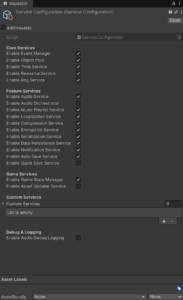
The main switchboard is ServiceConfiguration, a ScriptableObject that controls which engine services are enabled. This means a project can use a minimal core for prototypes or a fuller stack for production.
That matters because not every game needs every system.
A small arcade prototype may only need events, resources, pooling, and time. A content-heavy mobile game may also need saves, localization, notifications, deterministic random streams, and Addressables.
The goal is not “everything always on.” The goal is “the right systems on purpose.”
-

- Service Configuration
The Setup Wizard
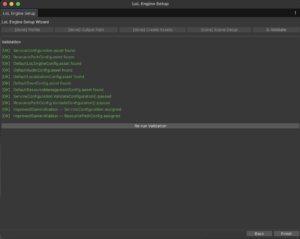
Version 0.16.1-beta added the Setup Wizard to make first-time configuration easier. This became important as the engine moved toward being production ready, where the first five minutes after import matter a lot.
The wizard gives a developer a guided path instead of forcing them to assemble config assets manually.
The Asset Store quickstart can stay short:
1. Import LoL Engine.
2. Run Tools > LoL Engine > Setup Wizard.
3. Choose a profile and open a sample scene.
The wizard is not just convenience. It reduces support risk because projects begin from known-good configuration.
Custom Game Services
Version 0.16.4-beta added IServiceRegistrar auto-discovery and a LateInitialize() lifecycle hook.
That was a major architecture step.
Engine services can register first. Game services can then register themselves without editing engine code. After all services exist, LateInitialize() gives services a safe point to resolve cross-service dependencies.
That pattern avoids a common Unity problem: one manager tries to find another manager before it exists.
The practical workflow looks like this:
public sealed class MyGameServiceRegistrar : IServiceRegistrar

{

public int Priority => 0;
public void RegisterServices(IServiceLocator locator, ServiceConfiguration config)
{
locator.Register(new MyGameService());
}
}
The game owns the game-specific service. LoL Engine owns the startup pipeline.
Validation Became Part of the Product
As the package moved toward 1.0.0-rc.4, setup validation became stricter. ImprovedGameInitializer now checks that enabled services can resolve their config assets through ResourcePathConfig, validates custom service entries, and reports dependency toggle issues.
That work is not visible in a trailer, but it is exactly the kind of behavior a framework needs.
If a service cannot start, the engine should tell you which config path failed and why. Silent partial startup is expensive to debug.
-

- LoLEngine-Setup Wizard – Step 5
Why Use a Service Locator?
Service locator is a tradeoff. It can be misused when it becomes a global dumping ground. In LoL Engine, it is used for a narrower purpose: a central runtime registry for engine and game services that are intentionally configured at startup.
The package also uses interfaces such as IAudioService, ISaveSystem, IEventManager, and IResourceService so game code depends on contracts rather than concrete classes.
That gives projects practical flexibility:
– Disable services that are not needed.
– Replace or extend services where the package allows it.
– Register game-specific systems without modifying engine source.
– Keep initialization order in one place
LoL Engine will be available for Unity 6000.0+.
– Asset Store: TBD
– Documentation: TBD